Use SnowSure inside Claude, ChatGPT, Cursor & more
One URL. No install. Real-time snow conditions and 7-day forecasts (14-day with Pro) for 500+ resorts, available in any AI chat that supports the Model Context Protocol.
MCP server URL
https://www.snowsure.ai/mcpStreamable HTTP · stateless · public · read-only
Live in the ChatGPT app directory. No connector setup — just hit Connect.
500+ resorts
From the Alps to Niseko, Whistler, Aspen, the Andes, and beyond.
7 weather models
ECMWF, GFS, GEM, JMA, ICON, Météo-France, Met Norway — averaged into one forecast.
49 tools, 12 resources
Grounded Q&A via ask_snowdata, powder rankings, insights, and destination hubs.
Add to Claude.ai
Available on Claude.ai (web) on the Pro, Max, Team, and Enterprise plans. Custom connectors are currently in beta.
- Open claude.ai and go to Settings → Connectors.
- Click Add custom connector.
- Name it
SnowSureand paste the URL:https://www.snowsure.ai/mcp. - Leave OAuth Client ID and Secret blank — SnowSure is public and read-only.
- Click Add.
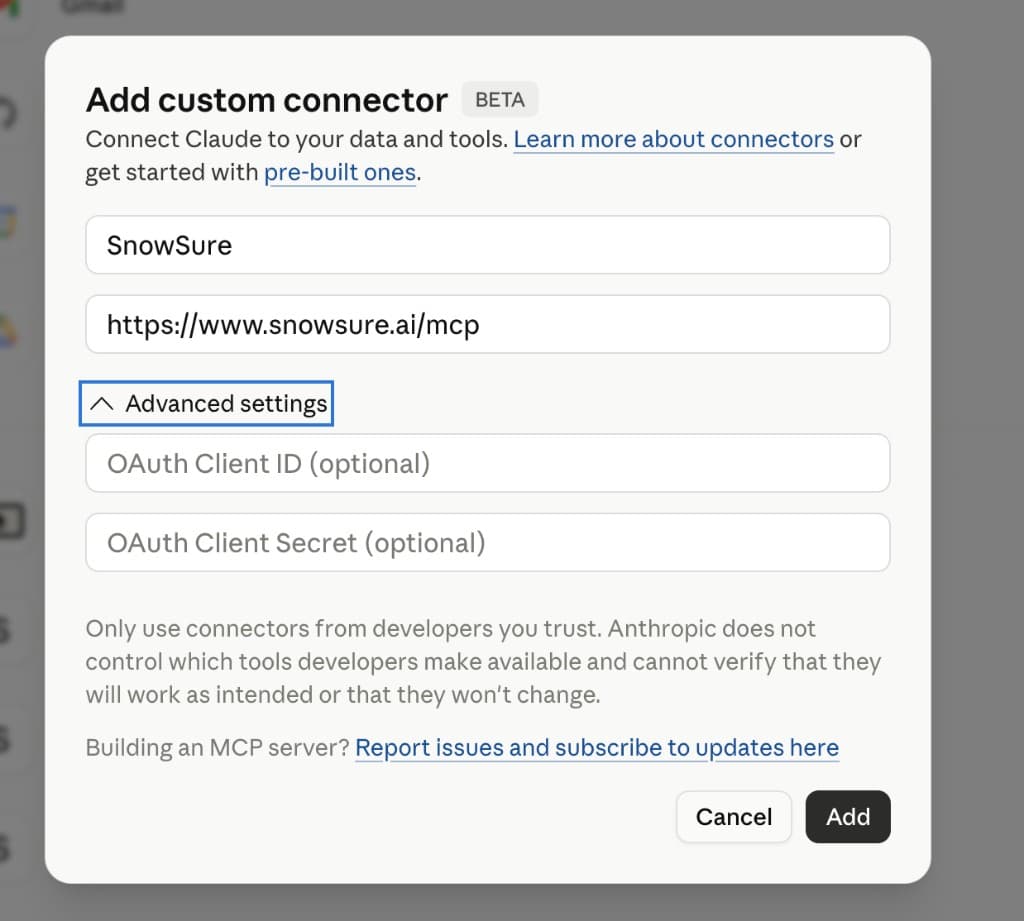
Claude’s “Add custom connector” dialog. Leave the OAuth fields blank.
Then: in any chat, look for the tools / connectors menu near the composer (often a slider or wrench icon) and toggle SnowSure on for that conversation. You only need to do this once per chat.
Add to ChatGPT
SnowSure is now an official ChatGPT App. The fastest path is the app directory — no connector setup, no URL to paste. Open the listing and hit Connect. You’ll get the same inline snow cards (single-resort report, ranked powder list, deepest-base) right in the chat.
Open SnowSure in ChatGPT →Prefer to add it manually as a connector? You can also point any recent ChatGPT build at the raw MCP URL. Look for “Connectors”, “Custom GPT connectors”, or “MCP servers” depending on the build.
- Open ChatGPT → Settings → Connectors (or MCP servers).
- Click Add HTTP server / Add custom connector.
- Name it
SnowSure, pastehttps://www.snowsure.ai/mcp, and save. - Authentication: None.
- Enable Developer mode under Apps & Connectors → Advanced if Connectors are not visible yet.
- After setup, ask for powder rankings or a resort report — SnowSure returns inline snow cards (ranked list + single-resort report) when ChatGPT renders Apps SDK widgets.
If you don’t see Connectors in your build yet, you can also use SnowSure through our existing Custom GPT. In the GPT builder, disable Web Browsing and paste instructions from gpt-instructions.md so answers come from the SnowSure Answer Engine, not J2Ski or other sites.
Add to Cursor
Cursor supports both HTTP and stdio MCP servers. We recommend HTTP (no install).
- Open Cursor → Settings → Cursor Settings → MCP & Integrations.
- Click Add new MCP server.
- Choose URL / HTTP, name it
snowsure, pastehttps://www.snowsure.ai/mcp. - Save and toggle the server on.
Or paste this directly into your .cursor/mcp.json:
{
  "mcpServers": {
    "snowsure": {
      "url": "https://www.snowsure.ai/mcp"
    }
  }
}Try it: MCP Inspector & curl
Want to poke at the server before wiring it into a client? Two quick options:
MCP Inspector (visual)
npx @modelcontextprotocol/inspector
# then paste https://www.snowsure.ai/mcp into the URL field
curl (raw JSON-RPC)
curl -X POST https://www.snowsure.ai/mcp \
  -H 'Content-Type: application/json' \
  -H 'Accept: application/json, text/event-stream' \
  -d '{
    "jsonrpc": "2.0",
    "id": 1,
    "method": "tools/call",
    "params": {
      "name": "find_best_powder",
      "arguments": { "minSnowfall": 10, "limit": 5 }
    }
}'Legacy: stdio package
For clients that don’t yet support remote MCP (older Claude Desktop builds, some self-hosted agents), the same tools are available as a local npm package.
{
  "mcpServers": {
    "snowsure": {
      "command": "npx",
      "args": ["-y", "snowsure-mcp-server"]
    }
  }
}
Source on GitHub. The bridge code is MIT-licensed; the data it returns is SnowSure’s, under the SnowSure data terms (see Attribution).
What can I ask?
Once connected, just chat normally. The AI will pick the right tool automatically. Some ideas to get started:
Discovery
- “Where’s the best snow right now?”
- “Top 5 ski resorts in Europe by SnowSure score.”
- “Which resorts in Japan got the most fresh snow in the last 24 hours?”
- “Find me powder in the Alps with at least 15cm overnight.”
Specific resorts
- “What are conditions at Niseko Hanazono?”
- “Tell me about Jackson Hole — depth, recent snow, forecast.”
- “How’s Val d’Isère looking for next week?”
- “Show me the live webcams for Cervinia.”
Forecast confidence
- “Compare the forecasts for Whistler and Aspen.”
- “How reliable is the forecast for Zermatt? Show me model agreement.”
- “Which model is most bullish on snow for St. Anton this week?”
Trip planning
- “I’m an advanced skier looking at the Alps in late February. Where should I go?”
- “Find resorts with at least 200cm base, 2,500m+ summit, and SnowSure score above 50.”
- “Plan a powder week in Japan for an intermediate skier.”
Tip: if the AI doesn’t reach for the connector, prefix your question with “using SnowSure, …” and it’ll call a tool instead of guessing from training data.
Resort operators: update content via MCP
Partners with a SnowSure admin account can connect Claude to edit resort copy(descriptions, links, season dates, webcam page URL, apres-ski block) and publish to the live site. This uses a separate authenticated endpoint — not the public read-only connector above.
Each resort can request a unique connector URL (recommended for Claude — no token field):
Per-resort URL (issued on request)
https://www.snowsure.ai/mcp/c/…Alternate shared endpoint with Bearer token: https://www.snowsure.ai/mcp/write
- SnowSure issues credentials:
npx tsx scripts/issue-mcp-api-key.ts your-resort-slug - Resort pastes their unique
/mcp/c/…URL into Claude (Auth blank) - Ask Claude to read
get_resort_editable_content, propose edits, thenupdate_resort_contentwithpublish: true
Full operator guide: docs/mcp-resort-content-write.md in the repo. Keys are scoped to one resort and cannot change weather scores or SnowSure ratings. Read the full resort operator handout →
Tools & resources exposed
The connector exposes 49 tools that the AI can call, plus 12 resources for raw data access. Use ask_snowdata for conversational Q&A.
Tools
get_destinationMulti-mountain hub with live data for each member resort (Niseko, Chamonix, Hakuba, etc.).
ask_snowdata ★Primary Q&A — grounded natural-language answers via the SnowSure Answer Engine (prefer this for chat questions).
get_snow_reportGlobal rankings by SnowSure score, fresh snowfall, depth, or 14-day forecast totals.
get_resortFull resort detail: live conditions, 7-model forecast, history, webcams.
get_resort_infoResort guide card: hero image, elevation, lifts/runs, season dates, ski passes.
get_resort_photosResort photo gallery carousel (official hero + Sanity images).
search_resortsResolve a name to canonical resort slugs (use before get_resort when unsure).
find_best_powderResorts with the freshest 24-hour snowfall, filtered by region and minimum cm.
find_powder_tripsBookable powder trips: ranks destinations by their 14-day forecast and pairs each with handpicked luxury ski hotels + booking links (optional vibe filter: lux/hip).
get_storm_watchStorm Watch: named multi-day storm systems the models flag days ahead, grouped as one event across every resort in the path, with window, per-resort totals and a confidence tier. Forecast, not observation.
get_powder_reelsPowder Reels — archived storm timelapses with verified accumulation data burned into the frames ("Proof of Powder"), newest-first with watch links (optional resort / storm-date / limit filters).
compare_forecastsSide-by-side forecast across all 7 weather models with confidence rating; the model table and days 8–14 need Pro.
get_weather_forecastDay-by-day weather for the next 7 days for any resort, 14 with Pro.
find_resorts_by_criteriaFilter by depth, elevation, runs, SnowSure score, country, region.
get_season_leaderboardRank resorts by how a season went, scoped to a state, province, country or region — snow days, season snowfall, powder days, or biggest single 24h storm, for any of 30 seasons back to 1996.
get_snow_historyOne resort: season-to-date totals plus 5-year and 30-year averages.
get_monthly_snowTypical snow month by month from ~30 years of reanalysis — for choosing dates. History, not a forecast.
get_trip_windowHistorical odds for specific trip dates at a resort: snow-day probability, window-scaled expected snowfall and base depth, the last 5 seasons for the same window, and the best nearby month. History, not a forecast.
get_elnino_signalResort-level El Niño / ENSO outlook: rank, tier, analog winters, forecast paragraph, and in-season scorecard from the 30-year fleet dataset.
get_elnino_rankingsRanked El Niño ski resorts by region or tier (prime / favored / ENSO-proof / timing play).
plan_ski_tripTrip recommendations for a region, ability level, and date window.
get_webcam_statusLive webcam links and thumbnails.
get_regional_summaryRegional / country statistics and top resorts by score.
get_southern_hemisphere_reportIn-season AU/NZ/AR/CL snow report (June–October NH off-season).
get_season_openingsResorts whose season opening date is a specific day — "what opens today?" (not all open resorts).
list_insight_categoriesTaxonomy of SnowSure intelligence card categories.
get_insightsSeason norms, forecast trust, and other intelligence cards (filter by category).
get_ml_trendsSnowSure-unique ML/AI datasets: powder/bluebird leaderboards, score components, model accuracy, bluebird predictions, forecast trust, snow events.
get_powder_reelsPowder Reels — archived storm timelapses with verified accumulation burned into the frames ("Proof of Powder"); filter by resort/date, newest-first with watch links.
get_passSki-pass details: operator, season pricing tiers, destinations, regions, buy link (Epic, Ikon, Mountain Collective, …).
find_pass_resortsList the resorts on a ski pass, optionally by region, with SnowSure slugs — "is <resort> on the Ikon Pass".
compare_passesCompare ski passes on price, resort coverage, and value vs window lift tickets — "which season pass includes <resort> — Epic or Ikon?".
compare_resortsCompare 2–4 resorts side by side across snow, terrain, and live conditions (all values from the conditions resolver).
get_avalancheOfficial avalanche danger bulletin for a resort’s forecast zone (US/Canada/Switzerland/France/Sweden/Austria/Italy/Norway/Germany/Spain/Andorra/Scotland/Slovakia/Slovenia/Czechia), EAWS 1–5 Very high scale, relayed with issuer + link.
get_snow_qualityWhat the surface skis like — Dry powder / Soft / Packed / Crust / Spring / Wet / Wind-affected / No snow — from the SLF SNOWPACK simulation at three elevations, with the reason and a confidence. Modeled surface only, not an avalanche assessment.
get_operating_riskWill the lifts run? 48h wind-hold / visibility / cold / heavy-snow risk from the Open-Meteo forecast.
get_road_access"Do I need chains?" — SnowSure drive call, feeder-city Saturday drive times (PGRI pilot), plus chain-control / mountain-pass / road-surface conditions on nearby highways (California, Washington, Colorado, Utah, British Columbia, Ontario, New England, Virginia, New Zealand via Caltrans/WSDOT/ODOT/MDT/WYDOT/CDOT/UDOT/DriveBC/Ontario511/Compass C2C/VDOT 511/NZTA).
get_road_camerasLive roadside DOT/CCTV camera stills on highways near a resort (California via Caltrans, Washington via WSDOT, Mount Rainier NP via NPS, Oregon via ODOT TripCheck, Montana via MDT 511, Wyoming via WYDOT 511, Utah via UDOT, British Columbia via DriveBC, Maryland via CHART/iMAP, New England via Compass C2C, Virginia via VDOT 511, New Zealand via NZTA, Alpine Europe via NAPSPAN) — what the drive looks like now.
get_road_weatherMeasured roadside weather (RWIS) near a resort — surface/air temp, visibility, wind, precip (Colorado via CDOT, Washington via WSDOT, Oregon via ODOT TripCheck RWIS, Montana via MDT 511, Wyoming via WYDOT 511, Utah via UDOT, New England via Compass C2C essData).
plan_ski_road_tripPlan a multi-stop ski road trip: top resorts in a region ordered into a drivable route with day allocation, drive legs, conditions, and chain-control.
find_flights_to_powderThe "get there" leg: nearest gateway airport(s) for a resort plus flight-search links (Google Flights / Skyscanner / Kayak) from your home airport.
save_resortAdd a resort to My Mountains, your saved resorts (requires a signed-in SnowSure account).
remove_saved_resortRemove a resort from your saved list (requires sign-in).
list_saved_resortsList your saved resorts (requires sign-in).
subscribe_alertsSubscribe to powder / opening / bluebird snow alerts (requires sign-in).
list_alertsList your alert subscriptions (requires sign-in).
unsubscribe_alertsRemove an alert subscription by id (requires sign-in).
book_lodgingFind lodging near a resort and get a booking link to confirm — never auto-books (requires sign-in).
get_my_snow_reportPersonalized snow report for your saved resorts, ranked best-first by live conditions (requires sign-in).
Resources
ui://widget/powder-list.htmlChatGPT inline card — ranked powder / snow report list (Apps SDK).
ui://widget/snow-report-card.htmlChatGPT inline card — single-resort snow report (Apps SDK).
ui://widget/resort-info-card.htmlChatGPT inline card — resort guide / mountain stats (Apps SDK).
ui://widget/resort-gallery-card.htmlChatGPT inline card — resort photo gallery carousel (Apps SDK).
snowsure://snow-reportCurrent global snow report (top 50 resorts).
snowsure://resortsAll 500+ resorts with current conditions.
snowsure://regionsRegion and country breakdown with resort counts.
snowsure://destinationsMulti-mountain destination hubs (Niseko, Chamonix, Aspen, etc.) with member resort slugs.
snowsure://insights/catalogIntelligence card taxonomy (categories and card ids).
snowsure://trends/catalogML/AI trend REST endpoint index (powder/bluebird leaderboards, score components, model accuracy).
snowsure://faq/indexSeed FAQ index (identity, culture, gear, passes) in all locales.
snowsure://api-docsOpenAPI-style endpoint index.
Attribution
Wherever you show data from the SnowSure MCP server, credit “Data by SnowSure.ai” with a visible link to https://www.snowsure.ai. That applies to the main server, every per-resort server and the stdio bridge.
Every tool result that returns SnowSure data carries the credit in structuredContent.credits: the SnowSure credit, the requirement, the terms URL, and the upstream sources whose licences require a credit too (Open-Meteo and the national weather models, Copernicus ERA5, SLF, Varsom and others). The same credit closes the text content, and the server’s initialize instructions tell the model to show it. Carry the upstream credits alongside ours.
Full terms: API and data attribution.
Troubleshooting
›Claude says “Couldn’t reach the MCP server”
Make sure the URL has no trailing slash or extra characters. Our endpoint is exactly https://www.snowsure.ai/mcp. If the error persists, try removing the connector and re-adding it — Claude caches the failure state.
›The AI ignores my SnowSure question and uses training data
In Claude.ai, make sure SnowSure is toggled on in the per-chat tools menu. Prefixing your prompt with “using SnowSure…” also works.
›Resort search returns nothing
Resort names sometimes differ from common spelling (e.g. “matterhorn-ski-paradise” for Zermatt). Ask the AI to search first — it'll return the correct slug to use for follow-ups.
›Is there an authentication option?
Not currently. The connector is intentionally public and read-only, mirroring our public REST API at /api/v1. If you need authenticated / write access for an integration, email api@snowsure.ai.
›What about rate limits?
No hard limits today; please be reasonable. We log usage and may add per-IP throttling if abuse becomes an issue. For high-volume use cases, talk to us.
Building something with SnowSure?
We’d love to hear about it. Whether you’re an AI agent author, a ski-trip planner, or a resort partner — tell us how the connector is showing up.


